Showing posts with label Mulicast. Show all posts

Saturday, December 1, 2018

BGP Multicast

Multicast BGP
Some Cases don’t want uni-cast traffic to route the same direction as multicast traffic, multicast BGP is basically a way to change the Reverse Path Forwarding Check without having to do static multicast routes everywhere

For multicast transit over the internet all hops must run multicast

  • What if the RPF check for a multicast source is via a unicast only peer?
    • Multicast BGP solves this by separating unicast RPF and multicast RPF
  • Multicast BGP advertises source networks for purpose of RPF check
    • By the way, Multicast BGP does not replace PIM
  • Multicast BGP preferred over uni-cast protocols for multicast RPF check
    • Like a static multicast route but dynamic
    •     Doesn’t require a separate routing protocol, only BGP extensions
       How Multicast BGP Works
  •       BGP peers negotiate Multicast Address Family during capabilities exchange
  •       Peers advertises NLRI under Multicast Address Family
  •       Network statement just like uni-cast
  •       All normal BGP rules apply
  •        When multicast traffic is received, MBGP learned routes are preferred over uni-cast

        Configuration
       Note - *** eBGP (which is AS- 20 lowest AS number) might want to use. If you want to use iBGP  (  which is AS-200), route will prefer IGP which is lower AS than iBGP and RPF check will fail. This point, you might want to change AS number lager than iBGP  **** 
  •        Router (config) # router bgp 200
  •        Router (config-router) # neighbor 10.35.35.5 remote-as 1
  •        Router (config-router) # address-family ipv4 unicast
  •        Router (config-router) # neighbor 10.35.35.5 activate
  •        Router (config-router) # address-family ipv4 multicast
  •        Router (config-router) # neighbor 10.35.35.5 activate
  •        Router (config-router-af) # network 10.45.45.0 mask 255.255.255.0
       BGP Multicast LAB


     R3 CONFIGURATION

       R3(config-router-af)#do sh run | section router bgp
       router bgp 2
       bgp log-neighbor-changes 
       neighbor 10.35.35.5 remote-as 1 
       !
       address-family ipv4 
       neighbor 10.35.35.5 activate
       exit-address-family
       ! 
       address-family ipv4 multicast
       network 10.12.12.0 mask 255.255.255.0
       network 10.45.45.0 mask 255.255.255.0
       neighbor 10.35.35.5 activate
       exit-address-family
       R3(config-router-af)#
    
       R5 CONFIGURATION

       R5#show run | section router bgp
       router bgp 1 
       bgp log-neighbor-changes
       neighbor 10.35.35.3 remote-as 2
       !
       address-family ipv4
       neighbor 10.35.35.3 activate 
       exit-address-family 
       ! 
       address-family ipv4 multicast
       network 2.2.2.2 mask 255.255.255.255 
       network 10.45.45.0 mask 255.255.255.0 
       neighbor 10.35.35.3 activate 
       exit-address-family

   ROUTER 5 RPF CHECK ROUTE
  •      Even though R5 unicast route through R3 but RPF route go through R4.


      Check route from R5 to R1 multicast and uni-cast routing   

     REFERENCE
         https://ine.com/
   https://www.cisco.com/c/en/us/td/docs/ios/12_2/ip/configuration/guide/fipr_c/1cfmbgp.html
   https://www.cisco.com/c/en/us/td/docs/ios/12_2/iproute/command/reference/fiprrp_r/1rfmbgp.pdf 


BIDIR (BIDIRECTIONAL PIM)

BIDIR ( Bidirectional PIM)

Use cases for this bidirectional is when your application is many to many where you are both the sender and the receiver and want to cut down the number of entries in the routing table 

  • We can use Bidir when we have lots of senders that are also receivers in the Multicast Network
  •          Traditional sparse mode forms two trees
o   Unidirectional SPT from source to RP

o   Unidirectional shared tree from RP to receivers

  •           Results in (*,G) and (S,G) entries in control plane
o   For many to many multicast application, doesn’t scale well

  • Bidirectional PIM solves by only allowing the shared tree (*,G) and never a SPT(S,G)
  
 How Bidirectional PIM works
  •      Defie an RP and group rnage as bidirectional
o   Stops formation of (S,G) for that range

  •       Build single (*,G) tree towarfs RP
o   Traffic flows upstream from source to RP
o   Traffic flows downstream from RP to receivers

  •       Removes PIM Register process
o   Implies that traffic from sources always flows to the RP          
  •        Uses designated forwarder (DF) for loop prevention
  •         One  DF is elected per PIM segment
o   Similar to assert, lowest metric to the RP wins
o   Highest IP address in tie

  •        Only DF can forward traffic upstream towards RP
  •        All other interfaces in OIL are downstream facing
  •         Removes the need for RPF check
o   Due to this all routers must agree on Bidir or loops can occur
 
  Bidir Configuration
  •        Router (config) # ip multicast-routing
  •         Router (config)#  ip pim bidir-enable
  •          Router (config)#  ip pim rp-address x.x.x.x bdir

  SHOW command
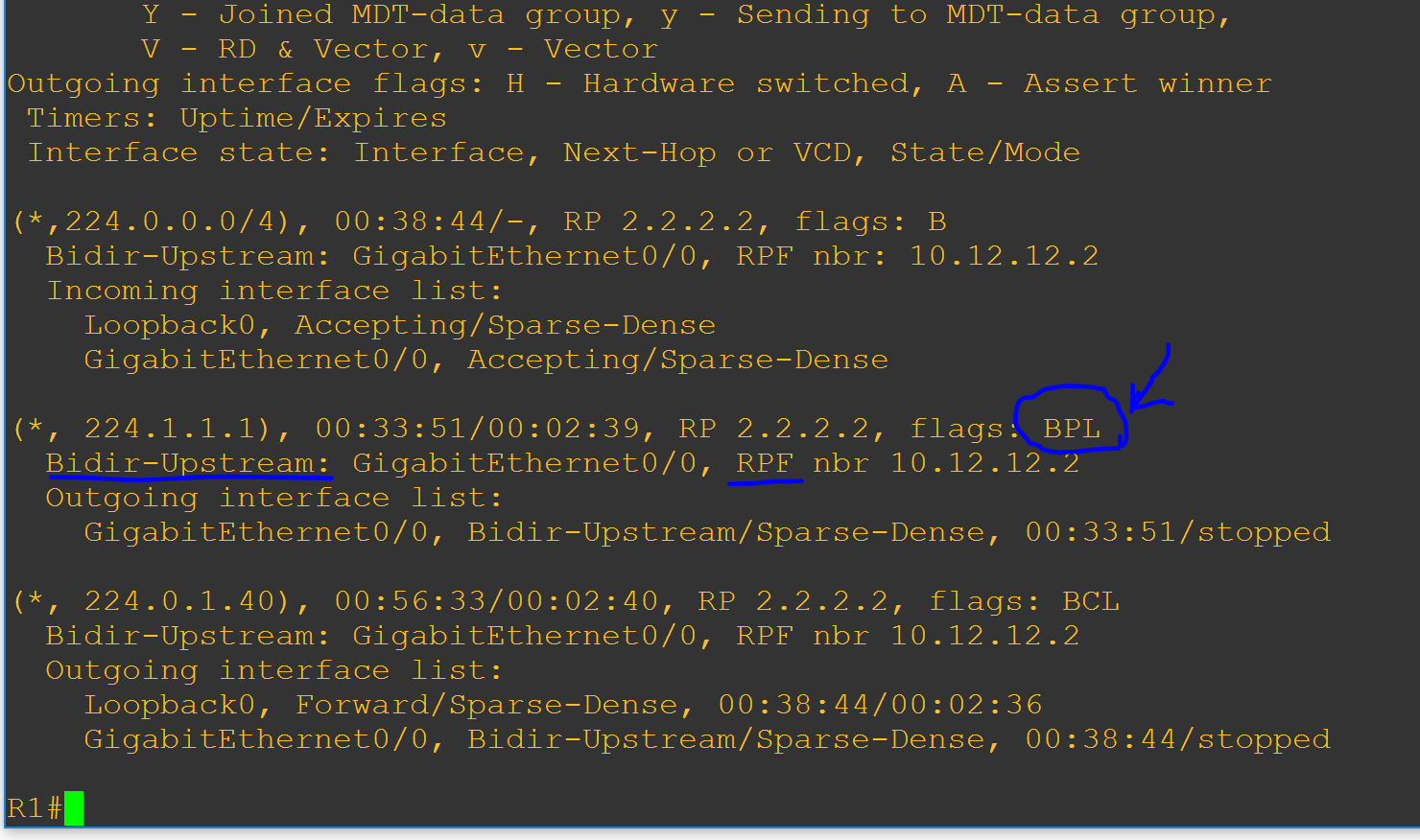
  •          Router # show ip mroute
       ·  Router # show ip pm rp mapping
       ·  Router # show run | inc bidir
       ·   Router # show ip mfib count
   LAB CONFIGURATION


  Router 2 configuration 
      This lab router 2 is RP bi-direcitonal 

   
   Checking mroute for routers
        After ip igmp join group 224.1.1.1 


   REFERENCE
  •         https://ine.com
  •         https://www.cisco.com/c/en/us/td/docs/ios/12_0s/feature/guide/fsbidir.html
  •         https://www.cisco.com/c/dam/en/us/products/collateral/ios-nx-os-software/multicast-enterprise/prod_white_paper0900aecd80310db2.pdf


Wednesday, November 28, 2018

ANY CAST ( Multicast Routing)

Any Cast Multicast 
  • Any cast is a method to create redundancy 
  • Traffic from source to destination reaches closest destination in the topology
  • Multiple destinations share the same address and route to the closest one based on the IGP/BGP table 
Any Cast RP
  • Use any cast load balancing to decentralize the placement of PIM spare mode RPs
    • All RPs must share the same information about senders and receivers
    • PIM register and join messages go to the closest RP in the topology
    • If one RP goes down, convergence is up to IGP
    • As long as one RP is up, new trees will be built up
MSDP
  • MSDP uses to advertise (S,G) pair between RPs
  • MSDP will make sure that PIM register is sent to one of the any cast RPs 
  • Another RP will not get PIM join message
    • MSDP will telll other RPs about (S,G) through an MSDP source active (SA) message
  • Allow PIM domain to use independent RPs
  • Any cast RPs are MSDP peers using unique address
    • Router (config) # ip msdp peer x.x.x.x connect-source loopback xx
    • Router (config) # ip msdp originator-id loopback xx
Where is going to use for?
  • It is useful when multicast goes on internet and we have many sources and want closet source to your region will send you the stream

ANYCAST LAB


R2 CONFIGURATION

R2#show run | section msdp
ip msdp peer 3.3.3.3 connect-source Loopback0 
ip msdp cache-sa-state
ip msdp originator-id Loopback0

This is rp address and any cast address ( This address will be shared with R3)
ip pim rp-address 23.23.23.23

R2#show ip int brief
Interface                         IP-Address         OK? Method Status                Protocol
GigabitEthernet0/0         10.12.12.2       YES NVRAM  up                    up
GigabitEthernet1/0         10.23.23.2       YES NVRAM  up                    up
Loopback0                      2.2.2.2            YES NVRAM  up                    up
Loopback23                   23.23.23.23     YES NVRAM  up                    up  ( any cast)
Tunnel0                          23.23.23.23     YES unset        up                    up
Tunnel1                          23.23.23.23     YES unset        up                    up

R2#show ip pim nei
Neighbor          Interface                Uptime/Expires    Ver   DR
Address                                                            Prio/Mode
10.12.12.1        GigabitEthernet0/0       01:02:29/00:01:30 v2    1 / S P G
10.23.23.3        GigabitEthernet1/0       01:02:29/00:01:15 v2    1 / DR S P G
R2#

R2#show ip msdp peer
MSDP Peer 3.3.3.3 (?), AS ?
  Connection status:
    State: Up, Resets: 16, Connection source: Loopback0 (2.2.2.2)
    Uptime(Downtime): 00:00:29, Messages sent/received: 1/1
    Output messages discarded: 0
    Connection and counters cleared 01:04:59 ago
  SA Filtering:
    Input (S,G) filter: none, route-map: none
    Input RP filter: none, route-map: none
    Output (S,G) filter: none, route-map: none
    Output RP filter: none, route-map: none
  SA-Requests:
    Input filter: none
  Peer ttl threshold: 0
  SAs learned from this peer: 0
  Number of connection transitions to Established state: 17
    Input queue size: 0, Output queue size: 0
  MD5 signature protection on MSDP TCP connection: not enabled
  Message counters:
    RPF Failure count: 0
    SA Messages in/out: 0/0
    SA Requests in: 0
    SA Responses out: 0
    Data Packets in/out: 0/0

R3 CONFIGURATION 
should be the same as R2

Useful "SHOW" commands
  • show ip msdp peer
  • show ip msdp sa cache
  • show ip pim neighbor
  • show ip pim interface
  • show ip pim rp mapping
  • show ip mroute
Useful "DEBUG" commands
  • debug ip pim
  • debug ip msdp detail
  • mtrace x.x.x
REFERENCE
  1. https://ine.com/
  2. https://tools.ietf.org/html/rfc4610
  3. https://www.cisco.com/c/en/us/td/docs/ios/solutions_docs/ip_multicast/White_papers/anycast.html
  4. https://community.cisco.com/t5/network-architecture-documents/rp-redundancy-with-pim-sm-anycast-rp/ta-p/3116911


PEN TESTING USEFUL TOOLS - FOCA

PEN TESTING USEFUL TOOLS FOCA ( Fingerprinting Organizations with Collected Achieves) FOCA is a tool used mainly to find leak information in...